 Posted by
What is HuntMapper?
If you’ve spent any time working a treasure hunt, you know the real challenge isn’t just solving clues — it’s managing everything that comes with them. Screenshots. Coordinates scribbled in notebooks. Tabs open across five browsers. Hand-drawn circles on printed maps. Notes scattered everywhere. Somewhere between researching at home and heading boots-on-the-ground, things get messy fast.
That kind of frustration is exactly what Jeff and Paul of Veil Hunts (FindVeil.com) set out to fix! Over the past year, the team has been quietly building alongside the community — sharing ideas, gathering feedback, and testing features behind the scenes — all with one goal: create a single place where hunters can plan, map, organize, and execute their searches with confidence.
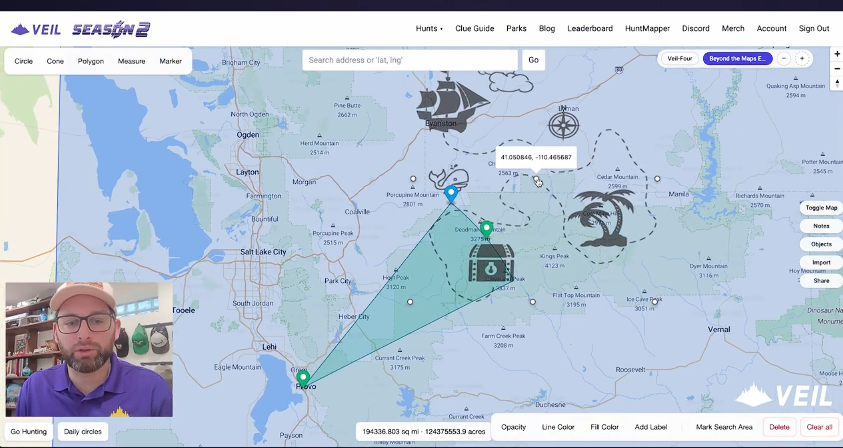
The result is HuntMapper — the first mapping platform designed specifically for treasure hunters. Built to support everything from armchair research to in the field searching, HuntMapper brings your clues, notes, shapes, measurements, and search plans together in one powerful, easy-to-use space.
And today, we’re talking with the team at Veil about how HuntMapper came to life, what it can do, and how it’s changing the way hunters prepare for the adventure ahead. Let’s get to it!
Six Questions on HuntMapper:
- 1Q) What an exciting new tool for searchers! What inspired you to create HuntMapper? Was there a specific hunt or moment that made you think, “There has to be a better way to do this”?
Thanks Jenny! We’re excited for it too. We created HuntMapper to give all treasure hunters access to tools that will help them with their solves. Our inspiration came from Veil hunters and learning how they research and plan their searches. Some hunters are very tech savvy, others will prefer simple maps and atlases, but everyone was using different apps for different things.
We wanted to combine the most frequently used features all in one place, and to make it simple enough for hunters that are new to the hobby while still offering more powerful features for seasoned hunters to plan their solves.
- 2Q) How long has the idea been in development? Have searchers used it in ways you didn’t expect? What’s a feature users might overlook – but shouldn’t?
We started development for HuntMapper back in July and released it with the start of our 7th hunt, Cabin Fever, a few weeks ago. We’re looking forward to seeing how our hunters use HuntMapper in their solves as the hunt goes on.
One feature users might overlook (but definitely shouldn’t!) is the object editor. Every object you place on the map–shapes, paths, lines, points of interest, images, you name it–it’s all easily editable in the object editor. You can modify coordinates, change the name of the object, change its color, thickness, opacity and more.
- 3Q) What does it help searchers do that they couldn’t easily do before? Is it more about organizing clues, analyzing maps, or discovering locations?
Many searchers use tools like Google Earth Pro–that was our go-to prior to developing HuntMapper. Google Earth Pro is great, but it doesn’t easily integrate between desktop and mobile, there’s no good way to keep notes, and things can get pretty cluttered.
With HuntMapper, you can organize your research into different hunts and toggle between your different hunt maps, you can keep notes directly in each hunt to do things like copying over passages from hunt riddles, adding details to points of interest, storing frequently visited website links, etc. Best of all, whether you’re on your computer, your phone, or out BOTG, all of your information is updated and right where you need it.
- 4Q) What is your most favorite feature of HuntMapper? What features are you excited to add next?
Our favorite feature is the Import feature. You can import images that you can move, rotate, scale, stretch, and change the opacity so that you can overlay them over the map (which is very helpful for a hunt like The Appalachian Footpath in There’s Treasure Inside!) You can also easily import .kml and .geojson files for things like hiking trails, shipwrecks, historic rail lines–the list goes on and on.
The in-progress feature I’m most excited for is the update to our “Going Hunting” feature, which will release with our app this spring. This new feature will let users set a BOTG start and finish time and name two emergency contacts they’d like to contact in the event that they don’t check back in by the time they said they would. The system will then send any search areas that you flagged prior to your hike that day, along with the actual path you hiked that day, to your emergency contacts.
- 5Q) If you could use your tool on any famous hunt (legendary or produced), which one would you pick? How would you use it?
We’re using HuntMapper right now to hone in our search area for The Appalachian Footpath Box! It’s so useful–we’re narrowing down our search area and getting closer to heading out BOTG each day. We’re using the image overlay tool, dozens of individual markers and measurements that have helped us hone in on a relatively small search area.
- 6Q) What advice would you give new searchers starting today? How can searchers learn more and take advantage of the tool?
The best advice we can give is to set yourself up for a positive experience before you go boots-on-the-ground. You most likely won’t find a treasure your first time out–even some of the most experienced searchers can’t search more than a few hundred acres in a day–but proper planning for your adventure will help to make sure you get to enjoy the thrill of the hunt and the great outdoors.
HuntMapper is $5/month – comes with a 30 minute free trial on signup. Searchers can learn more at findveil.com/huntmapper and can watch a tutorial on our Youtube Channel.